LogoCollectAI
Submit

Omni Flash

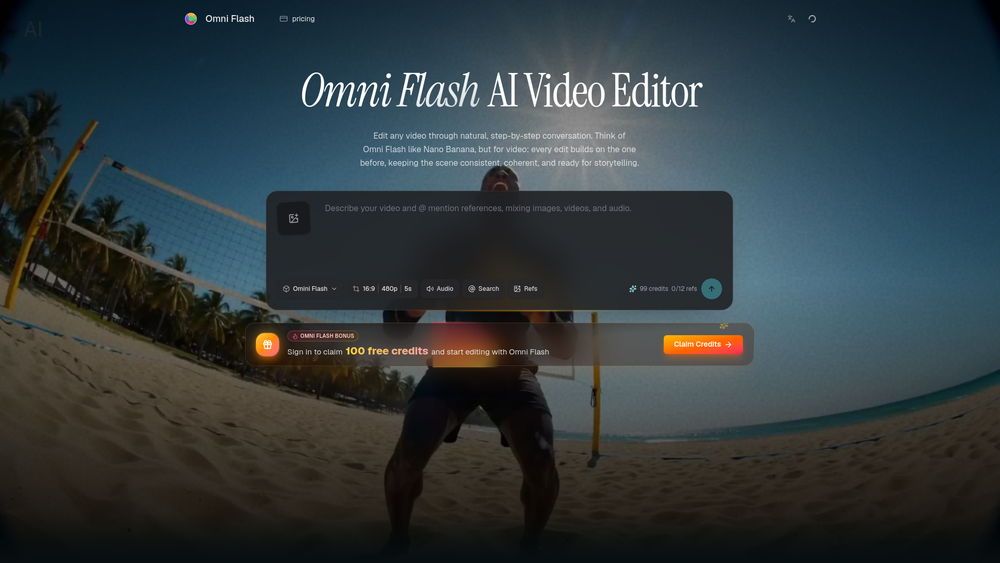
Omni Flash is a free AI video editor that lets you edit videos through natural conversation. Swap characters, transfer styles, and maintain scene coherence e...

Summary

Omni Flash is a conversational AI video editor that enables users to refine videos through natural language, reference-driven inputs, and multi-turn consistency.

What is Omni Flash?

Omni Flash is a powerful AI video editor that transforms the creative process by enabling users to edit videos through natural, step-by-step conversation. By leveraging advanced multimodal reasoning, it allows creators to refine actions, styles, and environments without the need for complex timelines or manual masking.

Key Features
  • Conversational Editing: Build and fine-tune your video using plain language, allowing for iterative changes to mood, objects, or camera angles.
  • Multi-turn Consistency: Maintain scene coherence across multiple editing turns, ensuring that characters and environments remain stable throughout the process.
  • Reference-Driven Creation: Use images, videos, audio, sketches, or text as references to guide the AI in generating specific visual outcomes.
  • Physics-Aware Logic: Create believable scenes by utilizing the tool's understanding of gravity, fluid dynamics, and real-world physics.
  • Seamless Character & Object Swapping: Replace subjects or props in existing footage while preserving the original motion, timing, and dialogue.
  • Multimodal Integration: Combine diverse inputs like text, sketches, and style references into a single, cohesive narrative output.

Key Highlights

  • Edit videos through natural, conversational prompts instead of complex timelines.
  • Maintain perfect scene consistency across multiple refinement turns.
  • Swap characters and objects while preserving original motion and dialogue.
  • Use images, sketches, and audio as references for precise creative control.
  • Ground your edits in real-world physics for more believable movement.
  • Transform visual styles and aesthetics while keeping the underlying scene logic intact.

Ideal For

  • 1.Content creators looking to streamline their video editing workflow with AI.
  • 2.Video editors who need to perform character or object swaps while preserving motion.
  • 3.Marketers creating consistent brand films using style and motion transfer.
  • 4.Storyboard artists who want to turn sketches into realistic, coherent video scenes.

Frequently Asked Questions

What is Omni Flash?

Omni Flash is a conversational AI video editor that allows you to refine videos step-by-step using natural language, references, and multi-turn editing. It focuses on maintaining scene consistency and coherence throughout the editing process.

Is Omni Flash free to use?

Yes, Omni Flash offers a free tier to get started with daily credits. You can sign up to claim bonus credits and explore its advanced AI video editing capabilities.

How is Omni Flash different from other AI video generators?

Unlike standard video generators that produce one-shot outputs, Omni Flash allows for iterative, multi-turn editing. This means you can refine specific elements like characters, objects, or camera angles while keeping the rest of the scene consistent.

Can I use my own reference files in Omni Flash?

Yes, you can upload images, videos, audio, sketches, or text briefs as references. Omni Flash uses these inputs to guide the editing process, ensuring your final output aligns with your creative vision.

Does Omni Flash support physics-aware video editing?

Omni Flash is designed to understand real-world physics, including gravity, fluid dynamics, and momentum. This ensures that your edited scenes feel grounded, realistic, and logically consistent.

Information

Traffic

Last update: N/A

Latest month
N/A

No traffic data available yet.

Newsletter

Join the Community

Subscribe to our newsletter for the latest news and updates