LogoCollectAI
Submit
icon of Image to Video AI

Image to Video AI

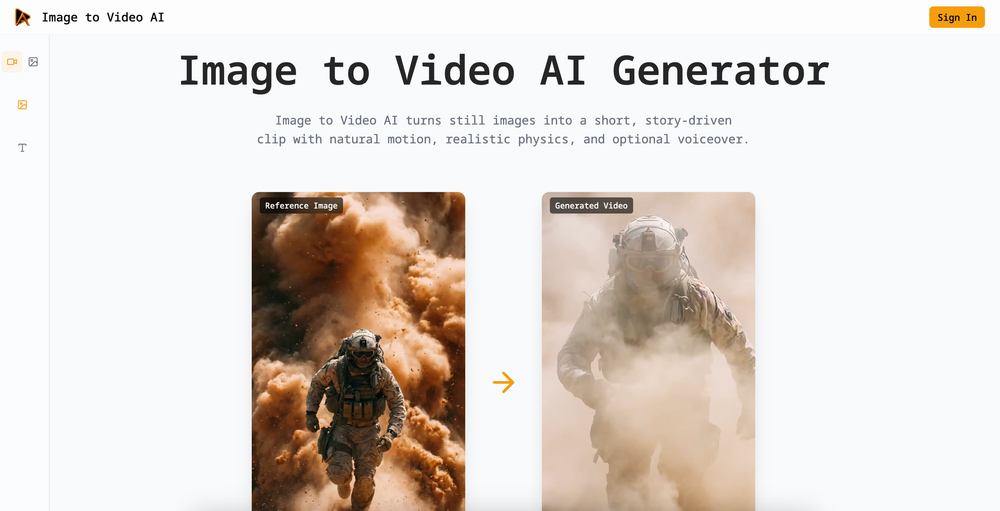
Image to Video AI is a web-based tool that converts still images into short video clips using AI models like Seedance 1.5 Pro.

Summary

Image to Video AI is a web-based tool that converts still images into short, motion-enabled video clips with integrated audio and frame control.

What is Image to Video AI?

Image to Video AI is a web-based platform designed to transform static images into short, story-driven video clips. It provides users with tools to control motion, physics, and audio, and includes integrations for professional workflows like Figma and Google Workspace.

Key Features
  • Model Selection: Supports multiple AI models, including Seedance 1.5 Pro, for varying motion and style requirements.
  • Frame Control: Allows users to lock the first and last frames to maintain storyboard consistency.
  • Multi-Image Reference: Supports multiple reference images to guide style, environment, and character consistency.
  • Native Audio: Includes an option to generate cinematic sound effects and ambient audio synced to the video motion.
  • Resolution and Duration: Offers adjustable video duration and output resolutions of 720P or 1080P.
  • Platform Integrations: Provides official plugins and extensions for Figma, Google Chrome, and Google Workspace.

Key Highlights

  • Generates video clips from single or multiple reference images.
  • Features Seedance 1.5 Pro for cinematic camera control and motion.
  • Offers native cinematic sound generation synced to video motion.
  • Provides first and last frame locking for storyboard consistency.
  • Includes official plugins for Figma, Google Chrome, and Google Workspace.
  • Supports adjustable aspect ratios and resolutions up to 1080P.

Ideal For

  • 1.Marketers creating product ads from still images
  • 2.Film and game designers developing concept art animations
  • 3.Social media creators adding motion to static posts
  • 4.Educators producing explainer clips from diagrams

Pros

  • Provides specific control over start and end frames for precise animation.
  • Integrates directly into common design and productivity tools like Figma and Google Drive.
  • Supports multi-image references to maintain visual continuity.

Cons

  • Requires credits to generate videos
  • Web-based platform with no mention of a standalone desktop application
  • Limited information on free usage tiers or pricing structures

Frequently Asked Questions

What is Image to Video AI?

The platform allows users to upload images and use AI models to generate short, motion-based video clips with optional audio.

What customization options are available for video generation?

The platform supports various aspect ratios, resolutions up to 1080P, and duration settings, with specific controls for start and end frames.

Does the tool integrate with other software?

The platform offers browser extensions and plugins for Google Chrome, Google Workspace, and Figma.

Is the service free to use?

The platform uses a credit-based system for video generation, as indicated by the "Generate Video (12 credits)" button.

Information

Domain Rating

Powered by Ahrefs

19

Tracking domain rating trend. Check back soon for history.

Traffic

Last update: N/A

Latest month
N/A

No traffic data available yet.

Newsletter

Join the Community

Subscribe to our newsletter for the latest news and updates