LogoCollectAI
Submit
icon of iGenFlow

iGenFlow

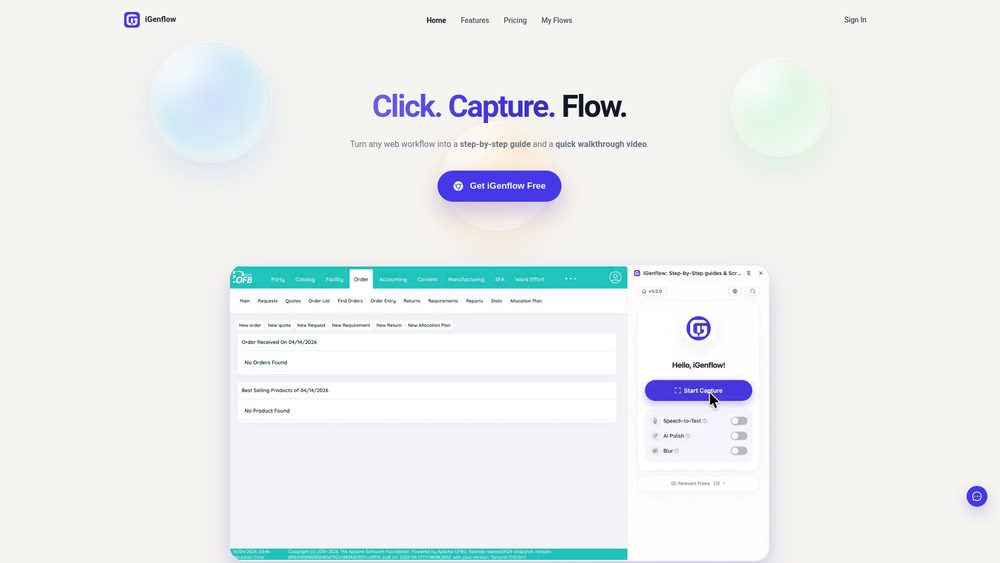
iGenFlow is an automated SOP generator that captures browser workflows to create step-by-step visual guides, saving you time on documentation and training.

Summary

iGenFlow is an automated SOP generator that captures browser workflows to instantly create clear, visual step-by-step guides for training and support.

What is iGenFlow?

iGenFlow is a powerful SOP generator designed to streamline the creation of professional, visual documentation directly from your browser activity. By capturing every click, page transition, and cursor movement, it eliminates the tedious manual process of writing step-by-step guides, allowing teams to focus on productivity rather than documentation.

Key Features
  • Automatic Workflow Capture: Seamlessly record your actions in any web application to generate accurate, context-aware documentation.
  • Instant SOP Generation: Automatically convert captured browser interactions into structured, readable step-by-step guides.
  • Visual Annotation Tools: Enhance your guides with clear screenshots, cursor markers, and highlights to ensure users follow instructions correctly.
  • Editable Content: Easily refine generated text, update instructions, and blur sensitive information to maintain privacy and accuracy.
  • Streamlined Exporting: Quickly export your finished workflows to share with your team, integrate into knowledge bases, or use for onboarding.

Key Highlights

  • Automates the creation of SOPs by recording real-time browser activity.
  • Reduces documentation time by eliminating manual screenshotting and writing.
  • Provides professional, visual guides with annotated screenshots and cursor tracking.
  • Includes built-in editing tools to blur sensitive data and refine instructions.
  • Supports team collaboration by making knowledge sharing fast and consistent.
  • Offers a freemium model to help teams get started with process documentation immediately.

Ideal For

  • 1.Customer support teams needing to create rapid troubleshooting guides.
  • 2.Product managers documenting new features for user onboarding.
  • 3.Operations managers standardizing internal company procedures.
  • 4.Implementation specialists creating step-by-step client training manuals.

Frequently Asked Questions

Is iGenFlow free to use?

Yes, iGenFlow offers a free tier that allows users to capture and export workflows up to 50 steps, making it perfect for getting started with process documentation.

How does the iGenFlow browser extension work?

iGenFlow works by installing a browser extension that records your clicks, page transitions, and cursor movements in real-time, automatically converting them into a structured document.

Who should use iGenFlow for documentation?

iGenFlow is ideal for product teams, customer support agents, and operations managers who need to create clear, visual training materials and SOPs without manual writing.

Can I edit the SOPs generated by iGenFlow?

Yes, you can easily edit the generated guides, adjust text, highlight specific areas, and blur sensitive information to ensure your documentation is accurate and secure.

Information

Traffic

Last update: N/A

Latest month
N/A

No traffic data available yet.

Newsletter

Join the Community

Subscribe to our newsletter for the latest news and updates