LogoCollectAI
Submit
icon of AI Tech Packs

AI Tech Packs

AI Tech Packs generates factory-ready tech packs from garment images in minutes. Editable PDF/Excel export, replaces manual Illustrator/Excel work.

Summary

AI Tech Packs is an AI-powered tool that creates editable tech pack drafts from garment images for fashion manufacturing.

Editorial Verdict

AI Tech Packs is a practical choice for fashion designers and brands wanting to cut down tech pack creation time. Compared to manual workflows in Illustrator/Excel, it offers a fast first draft, but the output requires human review before sending to factories. The lack of transparent pricing on the site may be a drawback for budget-conscious buyers.

What is AI Tech Packs?

AI Tech Packs is a web-based tool that uses AI to generate technical specification packs (tech packs) for garment manufacturing from a single image (sketch, flat, or photo). The platform is backed by Y Combinator and has been used by 500+ fashion teams to build over 17,000 tech packs.

Key Features
  • Generates a first draft of a tech pack from a garment image, including specs, measurements, BOM, and construction details.
  • Editable web editor to review and modify all fields before export.
  • Exports to PDF and Excel formats.
  • Adobe Illustrator plugin available for Designer plan users.
  • Optional done-for-you agency service delivers factory-ready tech packs in 3–5 days.

Key Highlights

  • Generates tech pack draft (specs, measurements, BOM, construction) from a single garment image (photo, sketch, or flat).
  • Editable before export — review and change all fields in the web editor.
  • Exports to PDF and Excel.
  • Adobe Illustrator plugin available on the Designer plan.
  • Agency service offers done-for-you tech packs in 3–5 days.
  • Backed by Y Combinator; used by 500+ fashion teams, 17K+ tech packs built.
  • No need for Illustrator or Excel to create a tech pack.
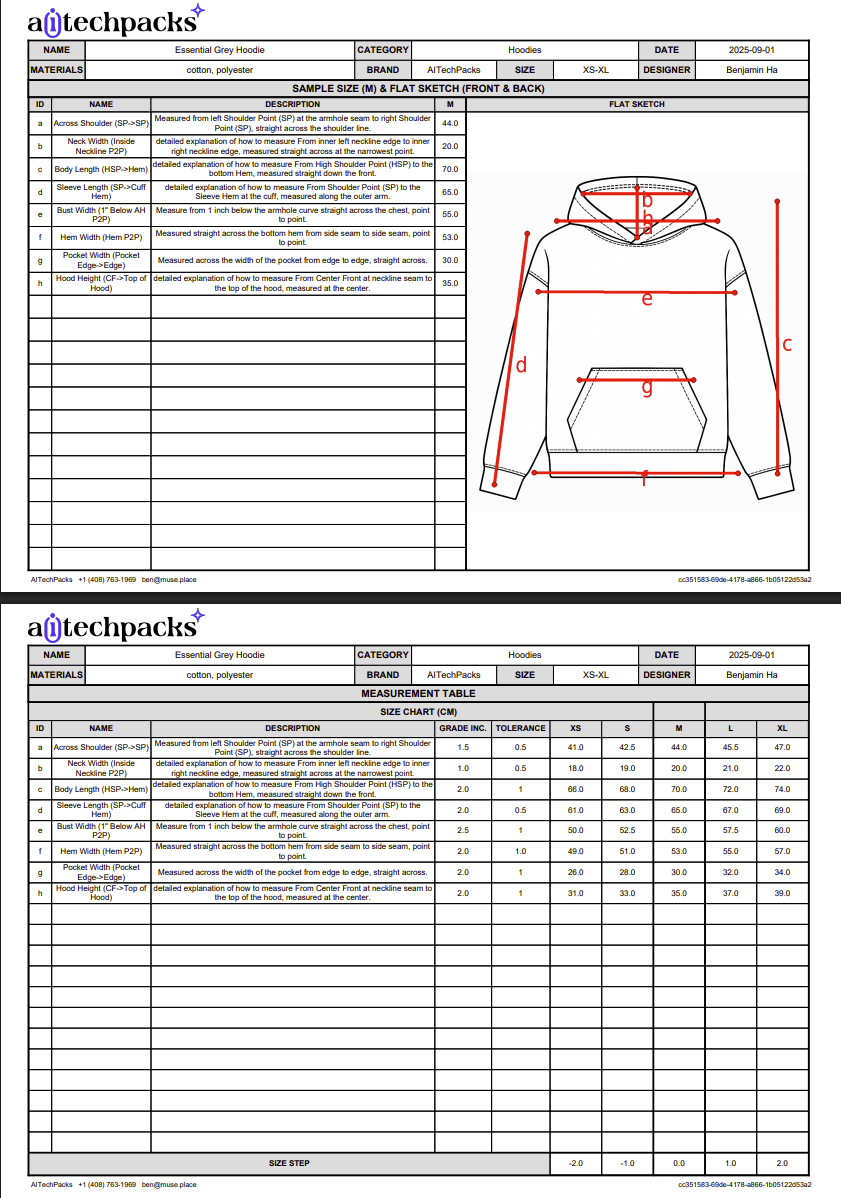
  • Free demo available with a sample hoodie tech pack.

Best For

  • First-time fashion designers who need a tech pack template to start quickly.
  • Growing fashion brands that want to reduce manual setup time in Illustrator and Excel.
  • Non-technical creatives who want to produce tech packs without learning professional design software.
  • Merchandising companies that need clear, standardized files to send to factories.
  • Teams looking for an AI-assisted first draft to speed up their tech pack workflow.

Not Ideal For

  • Users who need a completely automated factory-ready pack without manual review (AI draft requires checking).
  • Teams that require offline or desktop software (AI Tech Packs is web-only).
  • Users who need a mobile app version (not mentioned on the site).
  • Buyers who need upfront transparent pricing (not disclosed on the main page).

Pros

  • Reduces tech pack creation time from hours to minutes compared to manual Illustrator/Excel workflows.
  • Editable before export, allowing users to refine AI output without switching tools.
  • Exports in widely accepted formats (PDF and Excel) that factories can use directly.
  • Includes BOM and measurement details, which reduces back-and-forth with manufacturers.
  • Backed by Y Combinator and used by a growing number of fashion teams, indicating market trust.

Cons

  • AI-generated tech pack is a draft and requires user review to ensure accuracy before factory handoff.
  • No offline mode or mobile app; only available as a web application.
  • Pricing is not transparently listed on the main site, which may deter budget-conscious users.
  • The free version is limited to a demo; unlocking full features requires a paid plan.

Frequently Asked Questions

Can I edit the tech pack after AI creates the first draft?

Yes, AI Tech Packs creates an editable draft. You can review and change measurements, materials, flat sketches, artwork, colors, order details, and construction notes before saving or exporting.

What formats can I export from AI Tech Packs?

AI Tech Packs supports PDF and Excel export workflows for professional tech packs with specs, materials, measurements, flats, and construction details.

Do I need Adobe Illustrator or Excel to make a tech pack?

No. You can start from a garment photo, sketch, or flat, edit the tech pack in the web editor, and export finished files without using Illustrator or Excel.

Is an AI-generated tech pack ready to send to a factory?

Treat it as a fast production-ready draft. Before factory handoff, review measurements, materials, tolerances, artwork, labels, packaging, compliance details, and any construction notes that affect sampling or production.

Can AI Tech Packs create tech packs for us?

Yes, AI Tech Packs Agency is a done-for-you service. Send references and notes, and their team delivers clean PDF and Excel tech packs in 3–5 days.

Information

  • Websiteaitechpacks.com
  • Published date2026/07/08
  • Last reviewed2026/07/08
  • PricingFree to try with a demo; paid plans are available but pricing details are not disclosed on this page. A Student Plan and agency services are also offered.
  • PlatformWeb app accessed through a browser; no mention of mobile app, API, or downloadable software. Adobe Illustrator plugin is available for Designer plan users.

Domain Rating

Powered by Ahrefs

28

Tracking domain rating trend. Check back soon for history.

Traffic

Last update: N/A

Latest month
N/A

No traffic data available yet.

Alternatives to AI Tech Packs

ProductCategoryPricingSummary
PixMira AIAI Photo EditorPixMira AI offers free credits upon sign-up; additional credits can be purchased or a subscription plan can be chosen. Higher resolutions (2K/4K) require a VIP subscription.PixMira AI is a free web-based AI photo editor and image generator that uses text prompts for fast, consistent edits.
PixBulkAI Image GeneratorCredit-based pricing: images cost 2–10 credits each (about $0.02–$0.10). Free starter credits for new accounts, refreshed daily. Paid plans: Plus ($9.9/month yearly, 2,200 credits/month), Pro ($24.9/month yearly, 6,000 credits/month), Max ($49.9/month yearly, 15,000 credits/month). Credits never expire.PixBulk is a web-based AI tool that generates bulk product images from a CSV file for e-commerce sellers.
MeltFlex AIAI Image GeneratorPricing information was not fully detailed on the page. A free tier is available (no sign-up needed for demo), with a subscription plan for unlocking features like the budget slider. The 'Upgrade Plan' link suggests a freemium model.MeltFlex AI is a web-based tool that uses AI to redesign room photos with real, shoppable furniture from major retailers.

Newsletter

Join the Community

Subscribe to our newsletter for the latest news and updates