LogoCollectAI
Submit
icon of Flow AI Video

Flow AI Video

Browser-based AI video generator for text-to-video, image-to-video, and reference-to-video using models like Veo 3, Seedance, and Sora 2, with 720p/1080p out...

Summary

Flow AI Video is a browser-based AI video generator that creates short clips from text, images, or references using multiple AI models, with credit-based paid plans.

What is Flow AI Video?

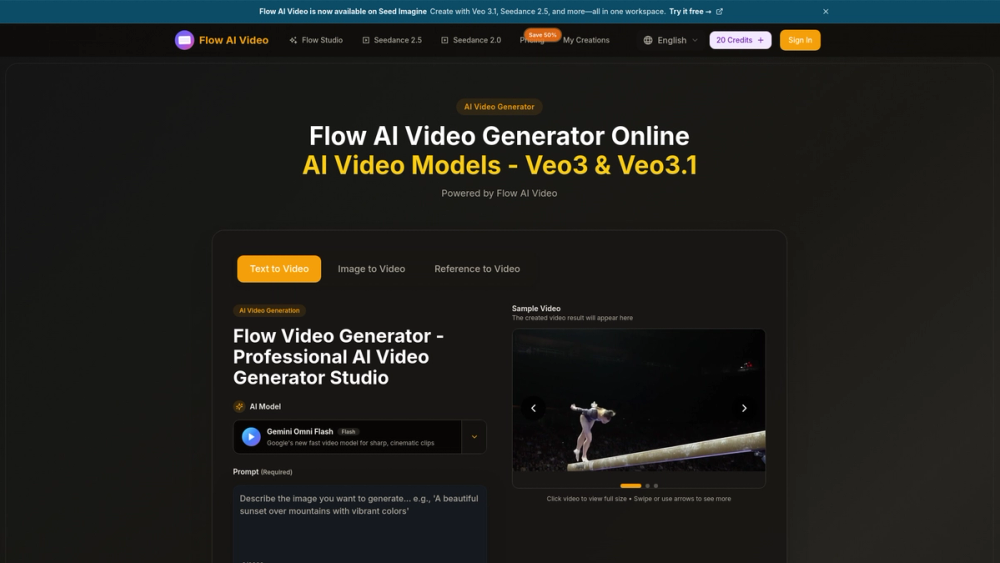
Flow AI Video (flowaivideo.org) is a browser-based AI video generator that creates short clips from text prompts, uploaded images, or reference material. It is operated by PixelForge LLC and is not affiliated with Google, despite the "Google Flow Video" naming used throughout the page.

The generator lets users pick from multiple AI models — including Veo 3/3.1, Seedance 2.0/2.5, Sora 2, Wan 2.5, and a default Gemini Omni Flash — and control aspect ratio, resolution, and clip length before generating.

Key Features
  • Three input modes: Text-to-Video, Image-to-Video, and Reference-to-Video tabs on the generator.
  • Multiple AI models: Veo 3 & Veo 3.1, Seedance 2.0 & 2.5, Sora 2, Wan 2.5, and Gemini Omni Flash (default).
  • Resolution options: 720p HD and 1080p Full HD (the page markets "4K" but the generator UI only lists these two).
  • Clip durations: 4, 6, or 8 seconds.
  • Aspect ratios: 16:9, 9:16, or Auto.
  • Prompt input: up to 2,000 characters.
  • Output format: videos download in MP4.
  • Localization: available in 10 languages (English, Chinese, French, German, Spanish, Italian, Korean, Portuguese, Arabic, Turkish).

Key Highlights

  • Offers multiple AI video models in one subscription: Veo 3/3.1, Seedance 2.0/2.5, Sora 2, Wan 2.5, and Gemini Omni Flash (default).
  • Generator UI provides 720p HD and 1080p Full HD output, despite the page marketing '4K' resolution.
  • Clips are limited to 4, 6, or 8 seconds in length.
  • Aspect ratio choices are 16:9, 9:16, or Auto.
  • Text prompts are capped at 2,000 characters.
  • Videos download in MP4 format.
  • Paid plans are watermark-free and include a priority generation queue.
  • Site is localized into 10 languages and is owned by PixelForge LLC, not affiliated with Google.

Best For

  • Marketers creating short social media and ad clips from text or images.
  • Content creators who want to compare multiple models (Veo, Seedance, Sora, Wan) under one subscription.
  • Small teams needing a commercial-use license, available on the Enterprise plan.
  • Beginners trying text-to-video with the free starter credits.
  • Users who want a browser-based tool with no local install.

Frequently Asked Questions

Which AI models can I use in Flow AI Video?

The generator offers Veo 3/3.1, Seedance 2.0/2.5, Sora 2, Wan 2.5, and a default Gemini Omni Flash model.

What resolutions and durations are available?

Output is limited to 720p HD or 1080p Full HD, and clips can be 4, 6, or 8 seconds long.

How many videos can I generate per plan?

The Basic plan allows up to 40 videos/month, Pro up to 200, and Enterprise up to 600, based on monthly credits.

Is there a mobile app?

No. Flow AI Video is browser-based and works on smartphone browsers, but a standalone mobile app is not yet available.

What format are generated videos downloaded in?

Videos are available for download in MP4 format.

Alternatives to Flow AI Video

ProductCategoryPricingSummary
RenderPopAI Image GeneratorfreeRenderPop is a browser-based AI image generator that turns text prompts or uploaded photos into images, with free daily Fast generations and credit-based Pro mode.
AI Lyric Video MakerAI Video GeneratorfreeAI lyric video maker that turns a song upload into an editable, word-synced lyric video.
Meta ImageAI Image GeneratorfreeMeta Image is an independent AI image and video generator combining Muse Image and Meta Video models in one web-based studio.

Newsletter

Join the Community

Subscribe to our newsletter for the latest news and updates