LogoCollectAI
Submit
icon of AI Resize Video

AI Resize Video

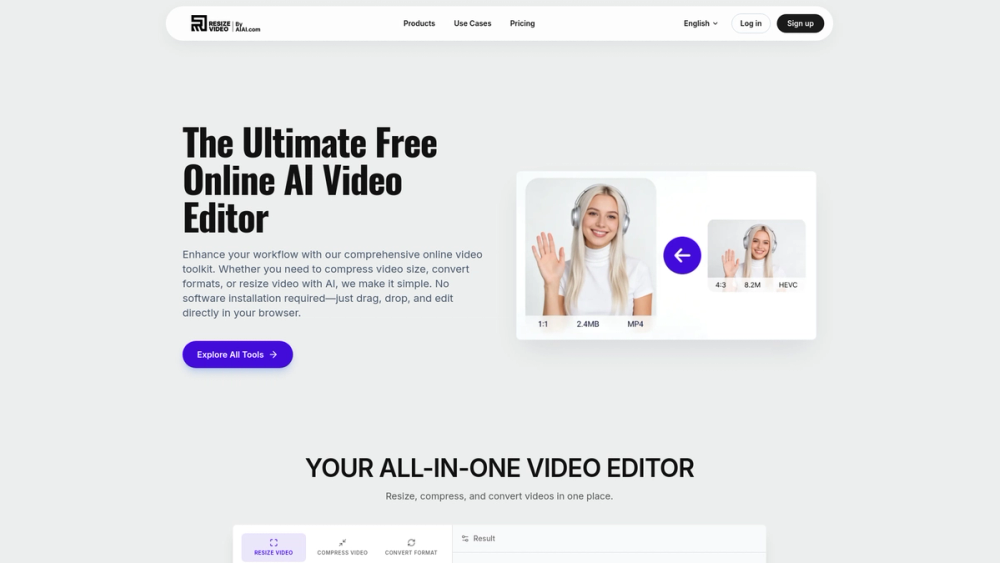
AI Resize Video is an all-in-one online toolkit to compress, resize, and convert videos for free. Edit, optimize, and format your media directly in your brow...

Summary

AI Resize Video is an all-in-one, browser-based AI toolkit that enables users to compress, resize, and convert videos for free without watermarks.

What is AI Resize Video?

AI Resize Video is a comprehensive, browser-based toolkit designed to simplify the video editing workflow for creators and professionals alike. By leveraging advanced artificial intelligence, it allows users to effortlessly compress, resize, and convert video files without the need for complex software installations. Whether you are preparing content for social media or optimizing files for professional distribution, this platform provides a fast, secure, and watermark-free solution.

Key Features
  • AI-Powered Video Resizing: Automatically adjust your video's aspect ratio for platforms like Instagram, TikTok, and YouTube while using generative AI to fill backgrounds naturally.
  • Smart Video Compression: Reduce large video file sizes for email, WhatsApp, or web use while maintaining high-definition visual quality.
  • Universal Format Conversion: Easily convert between popular formats including MP4, MOV, AVI, and WEBM, or extract audio to MP3.
  • Browser-Based Workflow: Edit your media directly in your web browser with no software installation or plugins required.
  • Privacy-Focused Processing: Ensure your data security with files that are automatically deleted from our servers immediately after processing.
  • Cross-Platform Compatibility: Access the full suite of tools seamlessly across Windows, Mac, Chrome, Safari, and mobile devices.

Key Highlights

  • Resize videos for any social platform using AI-driven background expansion.
  • Compress large video files without sacrificing visual quality.
  • Convert between multiple video formats instantly in your browser.
  • Export professional-grade videos with no watermarks.
  • Enjoy a secure, privacy-first editing environment where files are deleted after use.
  • Access a fully mobile-optimized interface for editing on the go.

Ideal For

  • 1.Social media managers needing to quickly adapt video content for different platforms like TikTok and Instagram.
  • 2.Content creators looking to compress large video files for easier sharing via email or messaging apps.
  • 3.Digital marketers who need to convert various video formats to MP4 for web and ad compatibility.
  • 4.Vloggers who want to change video aspect ratios without losing important footage or adding black bars.

Frequently Asked Questions

Is AI Resize Video free to use?

Yes, AI Resize Video offers a robust set of free tools for compressing, resizing, and converting videos without any hidden costs or watermarks.

Do I need to install software to use AI Resize Video?

Our platform is entirely browser-based, meaning you can edit your videos directly in Chrome, Safari, or Edge without downloading or installing any software.

What video formats are supported by AI Resize Video?

We support all major video formats, including MP4, MOV, MKV, AVI, and WEBM, ensuring you can process almost any file type you have.

Can I use AI Resize Video on my mobile phone?

Yes, our platform is fully mobile-optimized, allowing you to resize or compress your videos directly from your iPhone or Android device.

How does the AI video resizing feature work?

Our AI-powered resize tool intelligently expands your video background to fit new aspect ratios, such as 9:16 for TikTok or 16:9 for YouTube, without losing quality.

Information

Traffic

Last update: N/A

Latest month
N/A

No traffic data available yet.

Newsletter

Join the Community

Subscribe to our newsletter for the latest news and updates