LogoCollectAI
Submit
Logo of Claude Code

Claude Code

Claude Code is an agentic AI coding assistant that helps developers build, debug, and ship faster directly from their terminal, IDE, or Slack. Try it today.

Summary

Claude Code is an agentic AI coding assistant that integrates into your terminal and IDE to help you build, debug, and ship code faster with deep codebase awareness.

What is Claude Code?

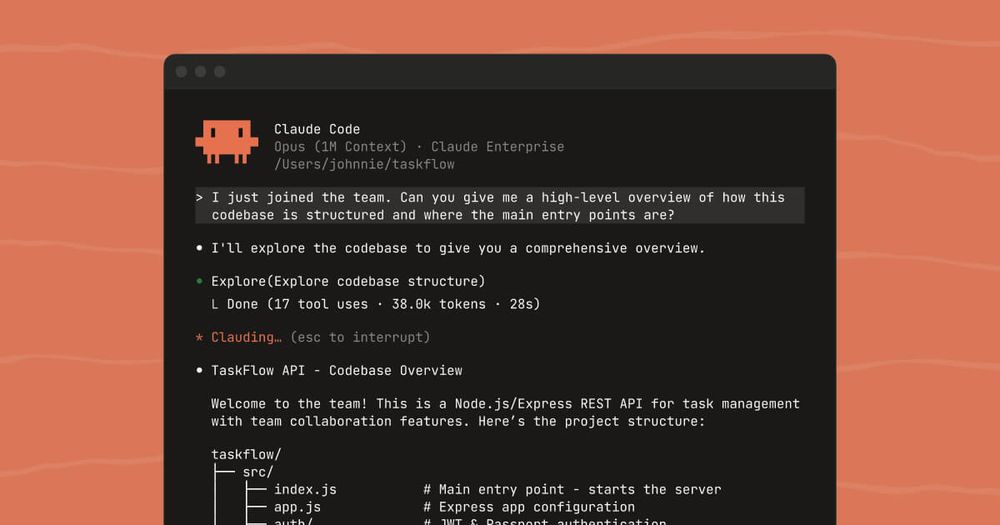
Claude Code is an advanced, agentic AI coding assistant designed to help developers build, debug, and ship software faster. By integrating directly into your terminal, IDE, or Slack, it understands your entire codebase and executes complex tasks, allowing you to focus on high-level problem solving rather than routine coding chores.

Key Features
  • Agentic Codebase Understanding: Uses intelligent search to map and comprehend your project structure, dependencies, and architecture without requiring manual file selection.
  • Multi-File Editing: Capable of making coordinated, accurate changes across multiple files simultaneously to implement features or refactor code.
  • Terminal & IDE Integration: Works seamlessly within your existing environment, including native extensions for VS Code, Cursor, Windsurf, and JetBrains.
  • Tool-Aware Execution: Can leverage your existing CLI tools, build systems, and test suites to verify changes and ensure code quality before submission.
  • Explicit Approval Workflow: Operates with a "human-in-the-loop" design, requiring your explicit permission before modifying files or running commands to ensure safety and control.
  • Slack Collaboration: Allows teams to kick off coding tasks, monitor PR status, and collaborate on issues directly within Slack.

Key Highlights

  • Automates routine coding tasks like bug fixes, testing, and refactoring to save days of development time.
  • Provides deep codebase context to enable accurate, multi-file edits that maintain project integrity.
  • Integrates natively into your existing terminal and IDE workflow, eliminating the need for context switching.
  • Maintains high security standards by running locally and requiring explicit approval for all file modifications.
  • Supports advanced workflows including PR submission, build verification, and CI/CD integration.
  • Offers flexible access through subscription plans or pay-as-you-go API pricing for teams of all sizes.

Ideal For

  • 1.Software engineers who want to automate routine debugging and testing tasks.
  • 2.Full-stack developers looking to accelerate feature implementation across multiple files.
  • 3.DevOps teams needing to integrate AI-driven workflows directly into their terminal and CI/CD pipelines.
  • 4.Technical leads managing large, complex codebases that require deep architectural understanding.

Frequently Asked Questions

Is Claude Code free to use?

Claude Code is available to users with a Claude Pro or Max plan, as well as those on Team or Enterprise plans. It can also be accessed via a Claude Console account using standard API pricing.

Is Claude Code secure for professional development?

Claude Code runs locally in your terminal and communicates directly with Anthropic's APIs. It requires explicit user approval before executing commands or modifying files, ensuring you maintain full control over your codebase.

What are the system requirements for Claude Code?

Claude Code supports macOS, Linux, and Windows. It integrates natively with VS Code, Cursor, Windsurf, and JetBrains IDEs, and can be used directly in your terminal or Slack.

How does Claude Code compare to standard AI coding assistants?

Claude Code uses agentic search to understand your entire codebase without manual context selection, allowing it to make coordinated, multi-file edits that are more accurate than standard autocomplete tools.

Information

Traffic

Last update: N/A

Latest month
N/A

No traffic data available yet.

Newsletter

Join the Community

Subscribe to our newsletter for the latest news and updates